
Quinn booked the cabin, Avery bought the groceries, Kai filled the tank and Noor paid for the boat. By Sunday night, four friends had four receipts and no idea who owed whom. IOUEZ has a group expense tracker built in, on the web and on Android: you add what everyone paid, it works out each person’s balance, and it suggests the fewest payments that settle everything. This playbook walks through it step by step, so a trip, a shared apartment or a birthday party can settle up once and cleanly.
Watch out
A group is for shared costs, not for loans. If someone ends the trip owing a large amount they’ll pay back over a few months, or if one friend fronts another real money, move that balance into a signed IOUEZ agreement between the two of them. Step 7 shows how. A group balance has no due date or signatures; an agreement has both.
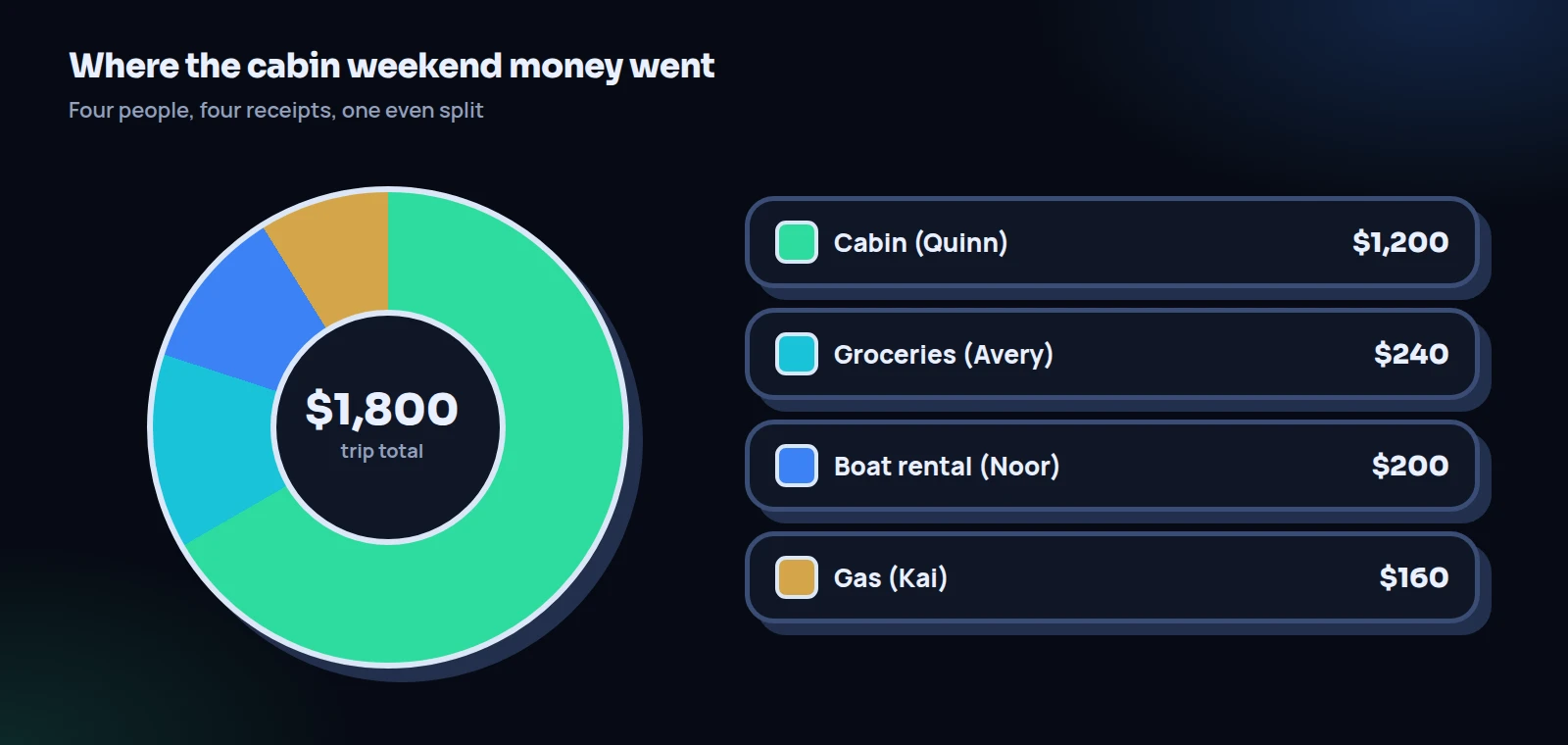
The cabin weekend in four numbers
We’ll follow one illustrative trip all the way through. Four friends, two nights, everything split evenly.
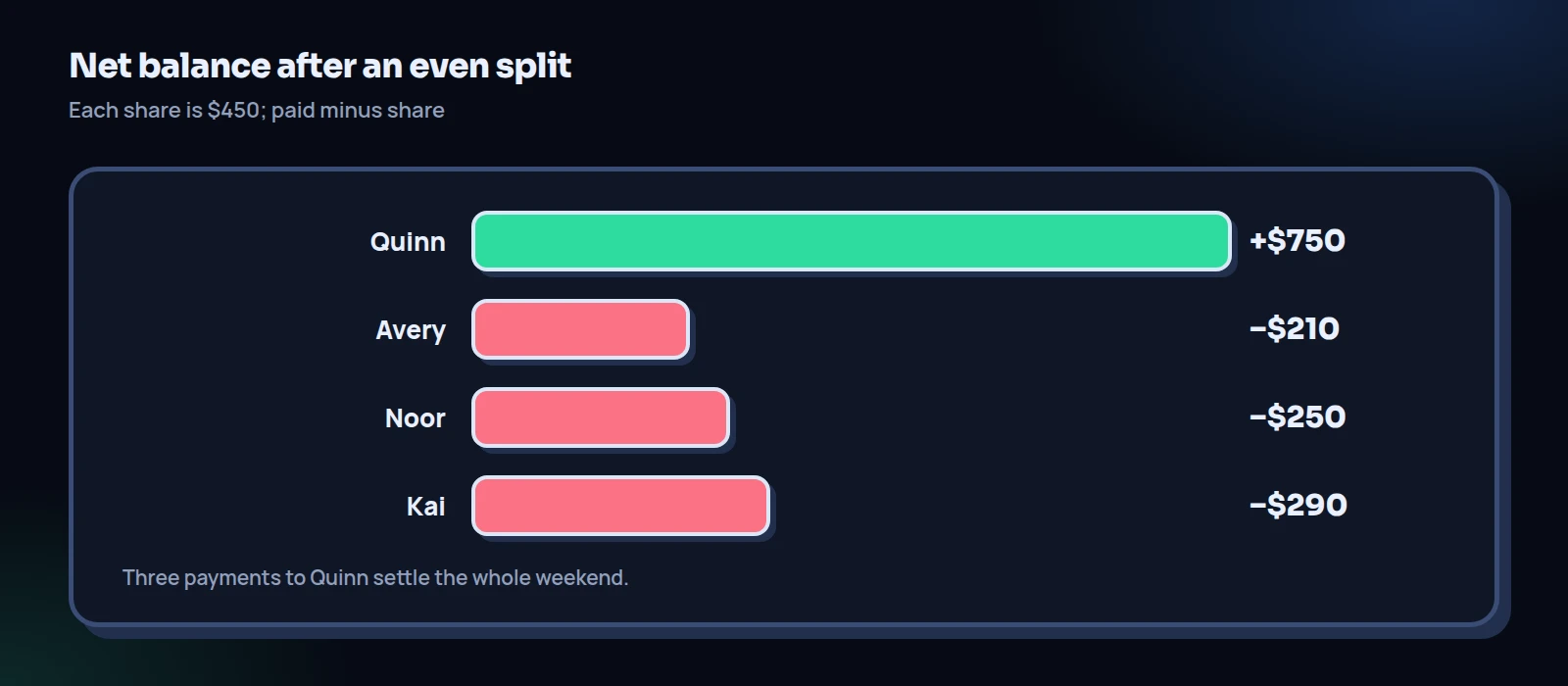
Twelve possible payments between four people shrink to three, because only Quinn ended up out of pocket by more than their share. IOUEZ does that shrinking for you, and it works the same for six people or ten.
Before you start: who can create a group in the group expense tracker
Anyone can be added to a group, see its expenses and add their own. Creating a group depends on your plan: it’s included on plans that include groups, and the pricing page shows which ones do today. If your plan doesn’t include it, the Groups page says so and offers an upgrade. In practice, one person in the group creating it is enough; everyone else just joins.
You’ll find Groups in the web app’s menu and as a tab in the Android app. Each group has a name, a type (trip, home, event or other) and one currency that every expense in it uses. One group expense tracker per trip or household keeps things tidy; don’t mix the cabin and the apartment in one.
The seven-step playbook
Each step says what to do and what usually goes wrong. The button names are the ones in the web app; Android uses the same words.
Agree the split rule before anyone spends
Decide, in the group chat, how costs will be shared: evenly, by nights stayed, or “everyone pays their own drinks.” Write it as one sentence and pin it. For our cabin, it was “Everything shared goes into the IOUEZ group and gets split four ways.”
What goes wrong: someone joins a day late and argues they shouldn’t pay a full share of the cabin. Decide that rule now, while nobody has a stake in the answer.
Create the group
Open Groups and choose New group. Give it a Group name (“Cabin weekend”), pick the Type (trip) and the Currency (USD), then choose Create group. You’re in it automatically.
What goes wrong: the wrong currency. Only the person who created the group can change it, so pick it carefully before the first expense goes in.
Add the members
In the same window, under Who’s in it?, tick people from your contacts. Contacts linked to a IOUEZ account see the group on their own phone or laptop. Anyone else can be added as a guest: type their name under Add someone who isn’t in your contacts. Guests are just names you keep track of; they don’t get notifications.
What goes wrong: a friend has an account but isn’t a linked contact, so they land in the group as a guest and never see it. Link each friend by email or phone in Contacts first.
Add each expense on the day
Choose Add expense. Fill in What was it?, the amount, Paid by and the date, then pick how to split it among the people you tick: Equally, Exact amounts, Percent or Shares. Members with an account get a notification with their share.
What goes wrong: the wrong name in Paid by, usually because the person adding it wasn’t the one who paid. Any expense can be opened again, edited or deleted, so fix it the moment someone spots it.
Read the balances
The group page shows Your balance, Total spent and a Balances list with each member’s net balance. Positive means the group owes that person; negative means they owe. The numbers always add up to zero.
What goes wrong: worrying about pennies. IOUEZ splits to the exact cent, and when a total doesn’t divide evenly, the leftover cents go to the first people in the split. Nobody loses or gains more than a cent.
Settle up and record each payment
The Settle up card lists who should pay whom (switch on Simplify debts for the fewest payments; more on that below). When Kai sends Quinn $290, either of them taps Record next to that line, or uses Record a payment for anything else. The balances update for everyone, and members get a notification.
What goes wrong: money moves in a payment app but nobody records it, so the group still shows Kai owing. Make “record it when you send it” part of the rule from step 1.
Turn a big leftover into a signed agreement
If someone can’t pay their balance this week and needs a few months, settle it out of the group and into a IOUEZ agreement: the person owed creates it, both sign, and the agreement gets a due date, reminders and a payment history of its own. Record the amount in the group as paid once the agreement is signed, so the debt isn’t counted twice.
What goes wrong: a $900 balance left sitting in a trip group for half a year. Groups are for splitting; agreements are for owing.
Simplify debts: fewer payments, same totals
The Settle up card has a Simplify debts switch, which the person who created the group controls. Off, it suggests payments that follow who paid for whom: everyone owes each payer their share, netted pair by pair. On, it finds the fewest payments that bring everyone to zero, even if that means money goes through someone who wasn’t part of the original expense.
The cabin weekend in the group expense tracker shows the difference nicely. With the switch off, every pair of friends nets out separately, so it’s six payments, including tiny ones like Noor paying Avery $10 (Noor’s $60 share of groceries minus Avery’s $50 share of the boat). With it on, it’s three payments, all to Quinn. Quinn still gets $750 either way, and everyone pays the same total; only the routing changes. If someone would rather pay the exact person who covered their dinner, leave it off. Our explainer on simplifying group debts shows the math behind it with a six-person example.
The message to send before anyone spends
Most group money fights start with an assumption nobody said out loud. A short message in the group chat, sent before the trip, prevents them. Quinn’s looked like this:
“Quick money plan for the cabin: I made a IOUEZ group. Whoever pays for something shared adds it there the same day. We split it four ways, and on Monday we settle up with whatever it suggests, by Friday. Sound good?”
Three thumbs-up and one “can mine wait until the 20th? That’s payday” later, the rules were set. Quinn said yes. It cost nothing to agree because it came before the trip, not after, when the same request might have sounded like an excuse.
Notice what the message does. It names the group expense tracker, the split rule, who adds expenses, when the settling happens and the deadline. Five facts, one paragraph, and nobody has to guess later.
The cabin weekend in the group expense tracker
Here’s what the group page showed on Sunday night, after four expenses went in, each split Equally among all four, with Simplify debts switched on. Each fair share is $1,800 divided by 4, which is $450.
Worked example: the cabin weekend settle-up
| Person | Paid | Fair share | Balance | Settle up suggests |
|---|---|---|---|---|
| Quinn | $1,200 | $450 | +$750 | Receives from the other three |
| Avery | $240 | $450 | −$210 | Avery pays Quinn $210 |
| Noor | $200 | $450 | −$250 | Noor pays Quinn $250 |
| Kai | $160 | $450 | −$290 | Kai pays Quinn $290 |
Check: +750 − 210 − 250 − 290 = 0. As each payment is recorded, its line drops off the Settle up card. When the last one goes in, the card says everyone is settled up.
Tip
Write expense names you’ll still understand in a month: “Groceries, Safeway, Fri” beats “food”. When Avery wonders why their share is $210 and not $200, the Activity list answers it line by line.
Roommates: the monthly version
A shared apartment is a trip that never ends, so make the routine boring on purpose. Suppose Avery and Noor share a two-bedroom where Avery pays the $2,100 rent and the $180 utilities from their own account. Noor’s half is $1,140 a month.
Make one group with the type set to home, and on the 1st, Avery adds the month’s costs as expenses: “October rent” $2,100 and “October utilities” $180, both paid by Avery and split equally. Noor’s balance shows −$1,140. Noor sends it, records the payment, and the balance goes back to zero. Expenses don’t repeat automatically, so it’s a minute of entry each month, and every month becomes its own clear set of lines in the activity.
For fairness questions like bigger bedrooms or different incomes, see how roommates can split rent and bills. A bigger bedroom is a natural fit for Percent or Shares on the rent line.
Events: birthdays, reunions and group gifts
Events have a twist: money often moves before the event, not after. If Kai books a $600 venue for a reunion and four friends promised to chip in $120 each, Kai makes an event group, adds the $600 deposit as an expense paid by Kai and split among the five of them, and everyone can see their $120 before the party, not after it.
If plans change and the venue refunds part of the deposit, edit the expense to the new amount. Every balance updates on its own, which is much easier than recalculating shares by hand and messaging everyone the new number.
The group tells you how much. A signed agreement is for anything that takes longer than a week to pay.
Uneven splits without the arguments
Even splits are easiest, but they’re not always fair. Three common adjustments, and how to handle each with the split options:
- By nights. If Noor stayed one night of two, split the cabin by Shares: 2 for Quinn, Avery and Kai, 1 for Noor. That’s 7 shares at about $171 each, and IOUEZ handles the cents. Everything else stays Equally.
- Opt-outs. If Kai didn’t drink, add the wine as its own expense and untick Kai, so it’s split among the people who did.
- Someone paid for someone. If Avery covered Quinn’s $40 ferry ticket, add it as an expense paid by Avery, split Exact with $40 for Quinn and nobody else ticked. It goes into the balances instead of becoming a side debt.
The rule of thumb: put every cost in the group expense tracker, split the cost the way you agreed, and let the balances do the rest. For a deeper comparison of methods, our guide to splitting trip costs fairly lays out five of them side by side.
Moving the money itself
IOUEZ records who owes what; the payment travels however your group already pays each other. Two official reminders are worth knowing if that’s a payment app. The Federal Trade Commission advises double-checking the recipient’s details before you send and protecting the account with multi-factor authentication or a PIN. And the Consumer Financial Protection Bureau points out that money held in a payment app balance typically isn’t FDIC insured, suggesting you move received money promptly into an insured bank or credit union account.
So if your group keeps a shared kitty in someone’s payment app between trips, keep it small, and move it to a bank account if it starts to grow.
One more habit: when you record a payment, put the payment app’s name or transaction ID in the optional note. If a transfer ever goes to the wrong person, that ID is the first thing the payment company will ask for, and you’ll have it next to the right payment instead of hunting through your phone.
When someone doesn’t pay
Group debts go quiet more often than one-to-one loans, because everyone assumes someone else will bring it up. The group keeps the number visible to everyone, but it doesn’t chase anyone with due dates. A short personal message helps: “Hey Kai, the cabin balance says $290. Can you send it this week, or would two payments of $145 be easier?”
Offering a split is not a sign of weakness. It’s usually what gets the money moving. If the answer is “I need two months,” that’s the moment for step 7: a signed agreement with dates and reminders, so neither of you has to bring it up again. Our checklist on settling up after a trip has more wording for the follow-up.
When the group is done
The person who created the group manages it: they can edit the members and the currency, and delete the group when it’s no longer needed. Everyone else can leave a group from its page. We’d keep a finished trip group for a few weeks after everyone is settled, in case a refund or a late receipt turns up, then tidy up.
Checklist: settle a group with the IOUEZ group expense tracker
- The split rule was agreed before anyone spent money.
- One group, with the right currency, created before the first expense.
- Every friend with an account is a linked contact, not a guest.
- Each expense added on the day, with the right person in Paid by.
- Uneven costs handled with Shares, Percent or Exact, not side deals.
- Every payment recorded, with the app or reference in the note.
- Any balance that will take months moved into a signed agreement.
Frequently asked questions
Is IOUEZ a group expense tracker?
Yes. Groups let you add shared expenses, split them equally, by exact amounts, by percent or by shares, see each person’s balance and settle up in as few payments as possible. Signed agreements between two people are still there for real loans.
Is it on the web and Android?
Yes, groups work in the web app and the Android app with the same account. iPhone users can use the web app in their browser.
Do my friends need IOUEZ accounts?
Not to be in the group. Without an account they’re a guest: a name you track for. With an account and a linked contact, they see the group, add expenses and get notifications.
Can anyone create a group?
Anyone can be added to one. Creating a group depends on your plan; the pricing page shows which plans include it.
What does “Simplify debts” change?
Only the routing. It suggests the fewest payments that bring everyone to zero, which can mean paying someone other than the person who covered your share. The amounts each person owes in total stay the same.
What if someone owes and is owed at the same time?
The group nets it out for you. Each person has one balance, so nobody sends money in a circle.
Sources
- Federal Trade Commission, Mobile Payment Apps: How To Avoid a Scam When You Use One, on checking recipient details and protecting payment app accounts.
- Consumer Financial Protection Bureau, Is the money I keep in my payment app safe?, on deposit insurance and moving balances to an insured account.